


WAPA.TV
3.3140.00 Reviews
App Specs
- Version
- 5.0.4
- Updated On
- License
- Free
- Downloads
- 100,000+
- Developer
- Wapa TV
- Categories
- News & Magazines
- Platform
- Android
Screenshots
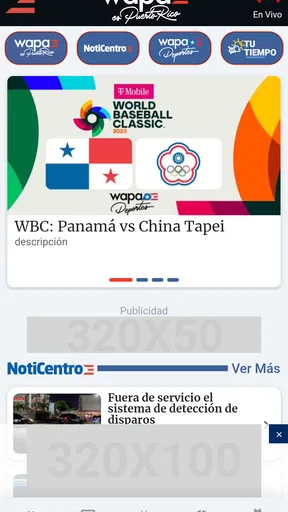

 Analysis by AppCompare
WAPA.TV is the kind of news and magazine app I would open when I want a direct connection to Wapa TV’s content rather than a broad news reader filled with unrelated sources. It is free, aimed at everyone, and developed by Wapa TV, so its appeal is quite focused: people who already follow the broadcaster or want its programming and current content in one mobile destination. After spending time with it, I see it as a convenient companion to the channel, but not as a complete substitute for a general news app.
The first thing worth understanding is the app’s scope. It is not trying to be a universal newspaper, a social network, or a tool for comparing many viewpoints in one feed. Its value depends on how much you care about WAPA.TV’s own material. That focus can make the experience feel simpler than opening several unrelated services, although it also means the app may feel limited if you expect wide international coverage, extensive customization, or the depth of a dedicated newspaper application.
How WAPA.TV feels in everyday use
I find WAPA.TV easiest to judge when I treat it as a direct route to one broadcaster, rather than as a general news hub. In everyday use, that distinction affects what I open it for, how I manage expectations around a connection, and whether it earns a regular place on my phone. It also makes trust and personal control worth considering separately from convenience.
A focused starting point for Wapa TV followers
When I use a broadcaster-specific app, I want to reach the content quickly, without having to search through a crowded home screen. WAPA.TV makes sense in that role. The store summary presents it as a way to enjoy Wapa TV’s content, and that straightforward purpose is important: this is best approached as a companion to the broadcaster, not as an all-purpose replacement for every media app on a phone.
A realistic everyday use case would be checking the app during a commute, a lunch break, or a quiet moment at home to see what Wapa TV has available. Someone who already watches the channel can keep the app alongside their regular entertainment and news tools, using it when they specifically want this publisher’s material. I would not install it expecting it to organize the entire news world for me. I would install it because I want Wapa TV within easy reach.
That distinction also helps set expectations about speed. A focused app can feel faster to navigate simply because the user has a clear destination, but perceived speed will still depend on the phone, the operating system, and the quality of the connection at that moment. I would judge the app less by whether every screen appears instantly and more by whether it lets me get from opening the app to the content I wanted without unnecessary searching.
What the current release means for potential users
The current version is 5.0.4, and the app was released on May 12, 2023. Those details matter mainly because users should keep the application updated through their normal app-store process. An up-to-date installation is the sensible starting point when evaluating stability, especially after changing phones or restoring applications from a backup.
Worth Reading Before You Choose

EA SPORTS FC Mobile 26 Is a Bigger Football Game, but It Takes Time

Flipboard Shows What News Apps Must Do Beyond the Feed

Switching to Android Auto Means Rethinking Your Driving Routine

Google Calendar Makes a Crowded Week Easier to Manage

Ludo King Makes the Most of the Minutes Between Plans

Baby Panda World Brings Quick Play to Modern Phones, but Its Game Library Feels Busy
WAPA.TV has passed the scale of a tiny personal project: it has more than one hundred thousand installs and an average rating of 3.3 from roughly seven hundred ratings. I read that as a mixed but meaningful signal. There is clearly an established audience, yet the rating does not suggest that every user will have a flawless experience. I would treat the app as worth trying for Wapa TV followers, while keeping expectations practical rather than assuming universal polish.
The review count is also around one hundred forty, which gives prospective users some evidence that other people have actively commented on their experience. I would pay more attention to recent comments than to the average alone, because app behavior can change between releases. A complaint that mattered in an older version may no longer apply, while a newly introduced issue may not be reflected in the overall score immediately.
Speed expectations without unrealistic promises
For a content app like this, speed is not only about animation or launch time. It is also about how quickly I can understand the home screen, identify what is available, and begin reading or watching. WAPA.TV’s focused identity gives it a clear advantage over a general news feed when I already know I want Wapa TV material. I am not spending time filtering publishers or building a topic list before reaching the source I opened the app to see.
At the same time, I would avoid treating the app as a guaranteed fast experience in every situation. News and media content can involve loading screens, changing availability, and connection-sensitive behavior. A weak mobile signal, crowded public Wi-Fi, or an older phone can make the same app feel very different from one session to the next. The honest expectation is convenient access when conditions are good, not instant performance regardless of the device or network.
One useful habit is to open the app briefly before you actually need it. If I were planning to follow a particular program or check content while away from home, I would test the app on that connection beforehand. That simple check tells me more about practical readiness than a general promise about speed. It also gives me time to switch to another way of following the broadcaster if the connection is unreliable.
What happens during heavier use
The app’s workload can change depending on how I use it. Browsing a few items is a lighter task than spending a long period with media content, moving between sections, and returning repeatedly throughout the day. During heavier use, I would watch for familiar signs of strain: slower transitions, content taking longer to appear, increased battery use, or the phone becoming warm. These are not reasons to dismiss the app, but they are useful signals for deciding how long to keep it open.
I would also avoid judging WAPA.TV after only one difficult session. If the app feels slow while I am in a basement, on a crowded train, or connected to an overloaded public network, the connection may be the main problem. My preferred test is to compare two ordinary situations: a stable home connection and the mobile network I normally use outside. If the experience improves clearly in the first situation, the limitation is probably not something the app alone can solve.
There is a practical trade-off here. A broadcaster app is convenient because it keeps the source close, but media-rich use can demand more from a phone than reading short text in a lightweight news reader. If I am trying to conserve battery or mobile data, I would use it in shorter sessions and close it when finished rather than leaving it active in the background. That is especially sensible on an older phone with limited free storage or battery capacity.
Another useful workflow is to decide what I want before opening the app. Instead of repeatedly launching it just to browse without a goal, I would use it for a specific check: catch up on Wapa TV material, look for a program-related item, or see what content is currently available. This reduces needless navigation and makes the app feel more responsive because I am measuring it against a clear task.
Reliability and recovering from a poor session
Reliability is more than whether an app crashes. For me, it includes whether the app returns to a sensible state after I leave it, whether it remains usable when the connection changes, and whether I can recover without wasting time. WAPA.TV’s moderate average rating means I would approach this area with some caution. I would not assume that every phone and network combination will behave identically.
If a session becomes stuck, my first recovery step would be simple: leave the screen, reopen the app, and try again on the same connection. If that does not help, I would switch between Wi-Fi and mobile data to separate a network problem from an app problem. Restarting the phone or checking for an available update would be reasonable next steps before deciding that the application is unusable.
I would also avoid repeatedly tapping a slow screen. With content apps, impatient taps can create a confusing sequence when a delayed action finally completes. Waiting briefly, returning once, and reopening the relevant section is usually cleaner. This is a small tip, but it can make a noticeable difference when a connection is temporarily struggling.
For users who depend on news access at a precise moment, that recovery process is important. I would not make WAPA.TV my only route to urgent information until I had tested it during my normal routine. Keeping a general news source available is sensible, not because WAPA.TV lacks value, but because a single broadcaster app naturally has a narrower role and can be affected by the same device or network problems as any other mobile service.
Device requirements and practical limits
WAPA.TV requires Android 6.0 or later, which makes it available to a wide range of Android phones that are still in everyday use. That minimum does not guarantee identical performance across all compatible devices. A newer phone with more available resources may feel smoother than an older model running several demanding apps at once. Compatibility is therefore only the first question; the condition of the phone matters too.
Before installing, I would check that the device has enough free space for a comfortable update process and that the operating system is not overloaded with background tasks. I would also close apps I no longer need if the phone is older or tends to slow down. These steps do not add features, but they make the test fairer and help distinguish a device constraint from a problem specific to WAPA.TV.
The age rating is Everyone, so the app is positioned for a broad audience rather than a restricted age group. That makes it easy to consider for a household where different people may want access to Wapa TV content. Even so, an Everyone rating should not be confused with a promise that every item will match every person’s taste. News and magazine material can still be serious, urgent, or simply not relevant to a particular viewer.
The free price removes the biggest barrier to trying it. I can install it and decide whether it fits my routine without committing to a purchase. That is valuable here because the app’s usefulness is personal and audience-dependent. If I regularly seek Wapa TV content, free access makes experimentation easy. If I rarely watch or read material from this broadcaster, there is little reason to keep another app occupying attention on the phone.
Where it beats general news alternatives
Compared with a broad news aggregator, WAPA.TV offers a more direct relationship with one broadcaster. A general app is better when I want multiple publishers, topic filters, international coverage, or a single place to compare reporting. WAPA.TV is better when my question is narrower: what does Wapa TV have for me right now?
Compared with visiting a broadcaster’s website in a mobile browser, an installed app can be more convenient for repeated access. I do not have to remember the address or search for the site each time. The trade-off is that an app takes a permanent place on the phone and may be less useful to someone who visits the broadcaster only occasionally. For light, infrequent browsing, the browser may remain the simpler choice.
Compared with social media, the app should appeal to users who want to go closer to the broadcaster itself rather than depend on an algorithmic timeline. Social platforms can be quicker for discovering what people are discussing, but they also mix official material with reactions, reposts, and distractions. WAPA.TV’s focused identity is a strength when I want less noise, while social media remains more useful for conversation and broad discovery.
There is no reason to choose only one option. My practical setup would be to keep WAPA.TV for Wapa TV-specific content and a broader news source for stories outside that publisher’s scope. That combination respects the app’s strength instead of asking it to perform a job it was not designed to do.
Who will get the most from it
I would recommend WAPA.TV first to existing Wapa TV viewers, people who want a dedicated mobile route to the broadcaster, and users who prefer a focused source over an overcrowded news feed. It is also a reasonable choice for someone who wants to try the official app without paying, then decide whether it deserves a regular place on the phone.
I would be more hesitant to recommend it to someone seeking a complete news dashboard. If your priority is comparing several outlets, following many countries, building detailed topic alerts, or reading a large range of independent publications, a general news application will probably serve you better. The same applies if you rarely consume Wapa TV content; the app’s focused purpose may not justify the extra installation.
My final performance verdict is cautiously positive. WAPA.TV has a clear job, a free entry point, broad Android compatibility from version 6.0 onward, and an established audience of over one hundred thousand installs. Its average score of 3.3 tells me to keep expectations realistic, especially around device and connection differences. I would install it if Wapa TV is already part of my viewing or news routine, test it during both Wi-Fi and mobile use, and keep a broader alternative for everything outside its specific coverage.
The best reason to choose WAPA.TV is not that it replaces every other news tool, but that it puts Wapa TV’s own content in a focused, convenient place. For the right viewer, that is enough to make it useful. For everyone else, the app is easy to try because it is free, but its narrow publisher focus should be the deciding factor.
Pros
- Live access to Puerto Rico news
- weather
- and local programming.
- Includes on-demand videos for watching reports at a convenient time.
- Useful for Puerto Rican viewers living abroad or outside broadcast coverage.
- Simple interface makes browsing news clips and shows fairly easy.
- Push notifications can help users stay informed about breaking local stories.
Cons
- Some content may be restricted by location or broadcast rights.
- Video quality and playback can vary with network speed and device.
- Frequent advertisements may interrupt viewing sessions.
- The app may use considerable mobile data when streaming over cellular networks.
- Coverage is primarily Puerto Rico-focused
- limiting its appeal to other audiences.
FAQs for WAPA.TV
What is WAPA.TV and what type of content does it offer?
WAPA.TV is the digital platform associated with Puerto Rico’s WAPA Television network. It generally provides access to news, entertainment, local programming, interviews, and selected live or on-demand video content. The exact catalog can change depending on broadcasting rights, location, and current programming schedules, so users should check the app description and available sections after installation.
Is WAPA.TV free to download and use?
The WAPA.TV app may be available to download without an upfront charge, but free access does not always mean that every feature or program is completely unrestricted. Some content may require registration, a participating television provider, or may be limited by regional availability. Before relying on the service, review the current terms, subscription details, and any in-app requirements shown in your country.
Can I watch WAPA.TV live through the app?
Live viewing availability depends on the app version, your location, licensing agreements, and whether WAPA has enabled streaming for a particular broadcast. Some users may see live news or scheduled programming, while others may mainly access clips and on-demand videos. A stable internet connection is recommended, and mobile data usage can be significant when streaming for extended periods.
Does WAPA.TV work outside Puerto Rico?
WAPA.TV may have geographic restrictions because television programs, sports, news segments, and other videos can be licensed for specific territories. Certain features may therefore work only in Puerto Rico or selected regions, while other content could remain accessible internationally. If you are traveling or living abroad, availability may vary, so confirm the supported region before downloading or creating an account.
What permissions and account information does WAPA.TV require?
Depending on the platform and version, WAPA.TV may request internet access, notifications, and permission to store temporary data needed for video playback and app performance. Registration, if required, can involve an email address or other basic account information. Users should review the privacy policy and permission prompts carefully, and avoid granting access that does not appear necessary for the app’s main functions.


